Real Estate CRM with Inventory Management: Manage Leads and Properties in One System
Manage real estate leads and property inventory in one CRM. Learn how BROSAVO connects requirements, property matching, follow-ups and sales.
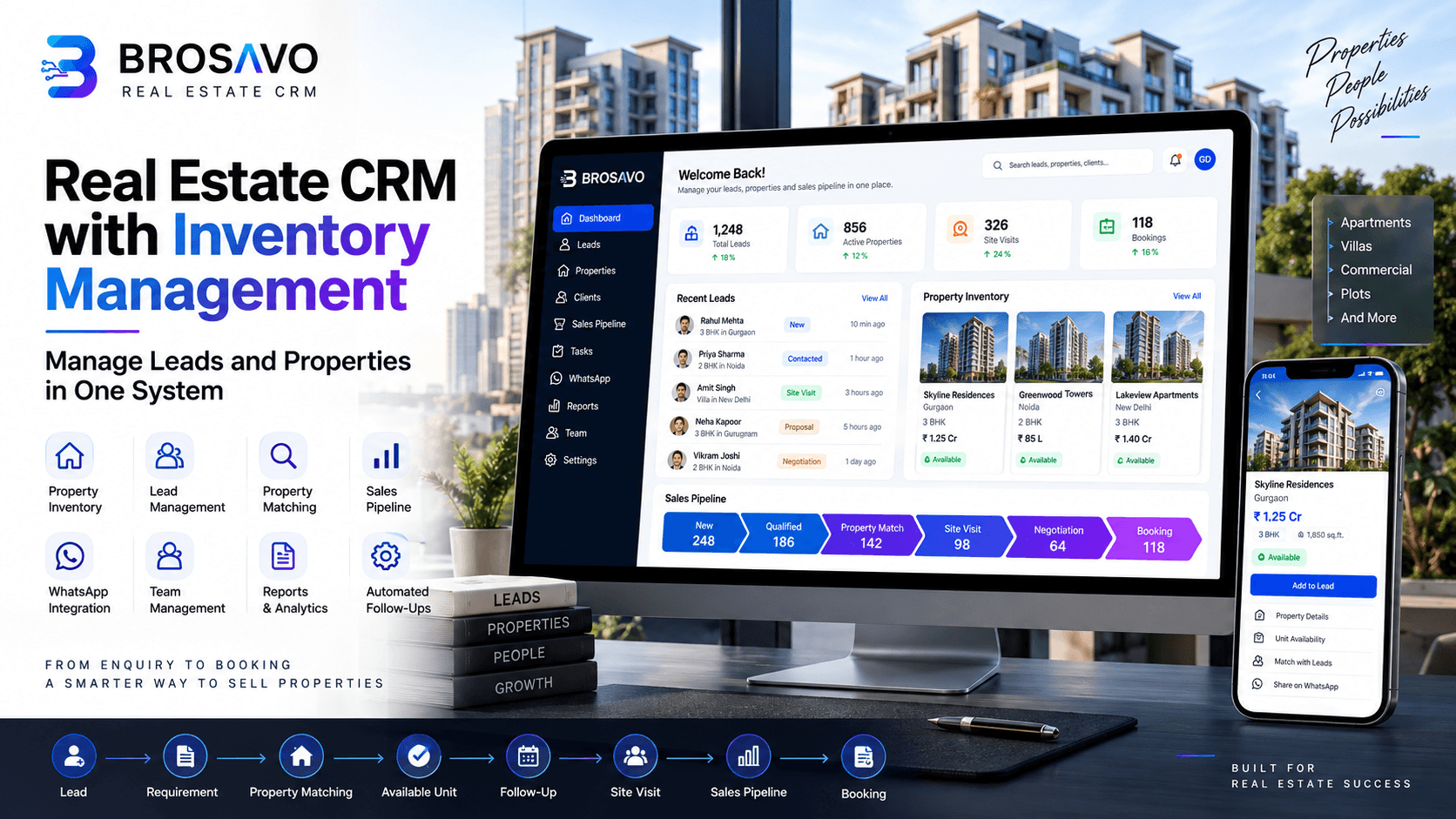
Real Estate CRM with Inventory Management: Manage Leads and Properties in One System
Managing real estate leads and property inventory separately can create unnecessary work for sales teams. A lead may be stored in a CRM while available properties are maintained in spreadsheets or another system.
A real estate CRM with inventory management brings these workflows together.
Instead of asking a salesperson to search for properties manually after receiving an enquiry, the process can follow a structured workflow:
Lead → Requirement → Property Matching → Available Unit → Follow-Up → Site Visit → Sales Pipeline → Booking
This gives real estate businesses a clearer view of both sides of the sales process: who wants to buy and what is available to sell.
For agencies, brokers, developers, and property sales teams, connecting lead management with property inventory can make everyday sales operations easier to manage.
What Is a Real Estate CRM With Inventory Management?
A real estate CRM with inventory management combines customer and lead management with property or unit inventory management.
A traditional CRM primarily helps a business manage:
- Leads
- Contacts
- Follow-ups
- Sales activities
- Sales pipelines
- Customer information
- Team activities
Inventory management adds another important layer:
- Properties
- Projects
- Units
- Availability
- Property details
- Pricing information
- Unit status
When these capabilities work together, sales teams can connect a buyer's requirements with properties that may be suitable for them.
For example, a buyer might be looking for a 3-bedroom apartment in a specific location within a particular budget.
Instead of searching through multiple spreadsheets, the sales team can use available property information to identify suitable options and continue the sales process from the same system.
Why Real Estate Businesses Need CRM and Inventory in One System
Real estate sales involve two constantly changing datasets:
Customer demand and property supply.
Customer demand includes:
- Who is looking?
- What type of property do they want?
- What is their budget?
- Which location interests them?
- When do they want to purchase?
Property supply includes:
- Which properties are available?
- Which units are suitable?
- What are their prices?
- Which units are already sold or unavailable?
- Which properties should be presented to the buyer?
When these two datasets are disconnected, salespeople spend more time searching and updating information.
A connected CRM and inventory workflow allows the sales team to move from lead qualification to property selection more systematically.
Problems With Managing Leads and Property Inventory Separately
Leads in Excel or CRM
A lead database tells you who your prospects are, but it does not necessarily tell you which property should be offered to them.
Salespeople may have to switch between systems or spreadsheets to find suitable inventory.
This can make the sales process harder to track.
Properties in Spreadsheets
Property inventory is often maintained in spreadsheets containing information such as:
- Project name
- Unit number
- Property type
- Area
- Price
- Availability
- Location
- Status
As inventory changes, spreadsheets can become difficult to maintain across multiple users and teams.
A centralized property inventory provides a more structured way to manage this information.
Manual Property Matching
Without a structured matching workflow, salespeople may manually compare buyer requirements against available properties.
For teams handling many properties and leads, this can become repetitive.
Property matching connects the two sides:
Buyer requirement ↔ Suitable property
Outdated Availability
Property inventory changes frequently.
A unit can move from available to reserved or sold while another unit becomes available.
If salespeople rely on outdated spreadsheets or disconnected systems, they may work with incorrect availability information.
A centralized inventory helps the team work from a common source of property information.
Missed Follow-Ups
Finding the right property is only one part of real estate sales.
A prospect may need:
- A follow-up call
- Additional property details
- A site visit
- Price information
- Internal approval
- Another discussion before making a decision
Without a structured sales process, these activities can become difficult to track.
A CRM connects these activities to the lead and sales pipeline.
How CRM Inventory Management Works
A practical real estate CRM and inventory workflow can look like this:
Lead → Requirement → Property Matching → Availability → Site Visit → Follow-Up → Sales Pipeline → Booking
1. Capture the Lead
The process starts when a potential buyer contacts the business.
A lead may come from:
- Website enquiries
- Property advertisements
- Phone enquiries
- Social media
- Referrals
- Property portals
- Direct enquiries
The lead should be recorded in the CRM along with relevant contact information and enquiry details.
The goal is to make sure the prospect enters the sales process rather than remaining in an untracked message, spreadsheet row, or salesperson's notes.
2. Understand the Buyer's Requirements
A lead becomes more useful when the sales team understands what the buyer actually wants.
Relevant information may include:
- Property type
- Preferred location
- Budget
- Number of bedrooms
- Required size
- Purchase purpose
- Preferred project
- Expected purchase timeline
These requirements provide the foundation for property matching.
3. Match the Buyer With Properties
Once the buyer's requirements are recorded, the sales team can identify properties that fit those requirements.
For example:
Buyer requirement
- 3-bedroom property
- Preferred location
- Budget range
- Specific size requirement
Available inventory
- Property A — matches location and size
- Property B — matches budget and property type
- Property C — matches most requirements
The sales team can then decide which properties are worth presenting to the buyer.
This is where a CRM with property inventory becomes more useful than a standalone contact database.
4. Check Property Availability
After identifying suitable properties, the next step is checking their current status.
Inventory may contain different statuses such as:
- Available
- Reserved
- Sold
- Unavailable
The exact statuses depend on how the business manages its inventory.
Keeping this information centralized helps salespeople avoid relying on disconnected property lists.
5. Schedule a Site Visit
If the buyer is interested, the next stage may be a site visit.
The CRM can keep the site-visit activity associated with the relevant lead and property.
This creates a clearer history of the buyer journey:
Enquiry → Matched Property → Site Visit → Follow-Up
The sales team can then continue working from the same lead record.
6. Track the Sales Pipeline
Not every property enquiry becomes a sale immediately.
A sales pipeline allows teams to track where each opportunity currently stands.
A workflow might include:
New Lead
↓
Qualified
↓
Property Matched
↓
Property Presented
↓
Site Visit
↓
Negotiation
↓
Booking
↓
Closed
The exact stages should reflect the company's actual sales process.
7. Convert the Lead Into a Booking
The final objective is to convert a qualified opportunity into a transaction.
When the buyer selects a suitable property, the sales team can continue the process while maintaining the relationship between:
Customer → Lead → Property → Sales Opportunity
This gives management better visibility into the journey from initial enquiry to conversion.
Key Features of Real Estate CRM With Inventory Management
A useful platform should connect the features that sales teams actually use during the property-selling process.
Property Inventory Management
Property inventory management provides a centralized place to organize properties and units.
Depending on the business model, information can include:
- Property name
- Project
- Unit
- Property type
- Location
- Size
- Price
- Availability
- Status
The objective is to make property information easier for the sales team to find and maintain.
Property Matching
Property matching connects buyer requirements with available properties.
Instead of treating the property database and lead database as separate systems, matching helps salespeople identify suitable inventory for individual prospects.
This is particularly useful for businesses with a large number of properties or units.
Lead Management
Lead management keeps prospect information organized throughout the sales process.
A CRM can help teams maintain:
- Contact information
- Lead source
- Requirements
- Assigned salesperson
- Follow-up activities
- Property interests
- Sales status
- Notes
This creates a structured record instead of scattered information.
Sales Pipeline
A sales pipeline gives teams visibility into active opportunities.
Managers can identify:
- New enquiries
- Qualified leads
- Active opportunities
- Site visits
- Negotiations
- Bookings
- Closed opportunities
This makes it easier to understand what is happening across the sales team.
Follow-Up Automation
Real estate sales frequently require multiple interactions before a buyer makes a decision.
A CRM can help salespeople organize follow-up activities associated with individual leads.
Instead of relying entirely on memory, personal notes, or separate spreadsheets, the follow-up history stays connected to the customer record.
Where automated workflows are configured, routine follow-up activities can also be streamlined.
WhatsApp Integration
Many real estate businesses communicate with prospects through messaging platforms such as WhatsApp.
When messaging workflows are connected to the sales process, conversations and customer activities can be easier to manage alongside the lead record.
The exact WhatsApp capabilities available depend on the CRM's implementation and configuration.
Team Management
Real estate businesses often have multiple salespeople handling different leads and properties.
Team management helps businesses organize:
- Lead ownership
- Sales responsibilities
- Team activities
- Opportunity assignments
- Pipeline visibility
This becomes increasingly important as the sales team grows.
Reports and Analytics
CRM and inventory data can provide useful visibility into sales operations.
Businesses may want to understand:
- Number of leads
- Lead sources
- Active opportunities
- Property demand
- Site visits
- Sales pipeline
- Conversion activity
- Inventory status
The specific reports available depend on the CRM platform and configuration.
Real Estate CRM vs Excel for Inventory Management
Excel can be useful for maintaining a simple property list, especially for a small number of properties.
The challenge appears when the business needs to manage both inventory and customer relationships at scale.
| Area | Excel | CRM + Inventory |
|---|---|---|
| Lead management | Basic/manual | Structured |
| Property inventory | Yes | Yes |
| Property matching | Usually manual | Connected workflow |
| Follow-ups | Manual | Organized around leads |
| Sales pipeline | Manual tracking | Dedicated pipeline |
| Team visibility | Limited | Centralized |
| Customer history | Manual | Connected to lead |
| Reporting | Spreadsheet-based | CRM reporting |
| Inventory + lead relationship | Often separate | Connected |
The key difference is not simply that a CRM replaces Excel.
The bigger advantage is connecting customer demand with property inventory and sales activities.
Benefits of Managing Leads and Inventory Together
1. Better Visibility
Salespeople can work with customer and property information in a connected workflow.
This reduces the need to constantly switch between separate files and systems.
2. Faster Property Discovery
When buyer requirements and property inventory are connected, salespeople can identify relevant properties more systematically.
3. Fewer Manual Processes
A structured CRM reduces dependence on manually maintaining multiple spreadsheets for leads, properties and sales activities.
4. More Organized Follow-Ups
Every interaction can remain associated with the relevant lead and sales opportunity.
This gives salespeople better context when continuing a conversation.
5. Improved Team Coordination
Managers can get a clearer view of lead ownership, active opportunities and sales activities.
6. Better Sales Pipeline Visibility
Instead of looking only at the number of leads, businesses can see how prospects move through the sales process.
For example:
100 Leads → 40 Qualified → 25 Property Matches → 15 Site Visits → 5 Bookings
The actual numbers will differ by business, but the pipeline structure helps teams understand where opportunities are progressing or getting stuck.
7. Centralized Property Information
A centralized inventory gives sales teams one place to work with property and unit information rather than maintaining disconnected property lists.
How to Choose the Right Real Estate CRM
Before choosing a platform, real estate businesses should evaluate the workflow rather than simply counting features.
Consider these questions:
Can it manage leads?
The CRM should allow your team to organize prospects and their requirements.
Can it manage property inventory?
You should be able to maintain the properties or units relevant to your sales process.
Can leads and properties be connected?
This is particularly important if property matching is a core part of your sales workflow.
Can the sales pipeline be customized?
Your CRM should support the stages your sales team actually follows.
Can your team track follow-ups?
Salespeople should be able to maintain a clear history of customer activities.
Can managers see team activity?
Management visibility becomes increasingly important as the organization grows.
Can you report on sales activity?
Look for reporting that helps you understand leads, opportunities, properties and conversions.
Is it easy for salespeople to use?
A powerful system is not useful if salespeople avoid using it.
The best CRM is the one that fits your actual sales process and is consistently used by the team.
Why BROSAVO?
BROSAVO brings together core workflows required by real estate sales teams.
The platform is designed around four important areas:
Lead Management + Property Inventory + Property Matching + Sales Pipeline
Instead of treating leads and properties as completely separate workflows, BROSAVO connects them around the sales process.
A typical workflow can be structured as:
Lead
↓
Buyer Requirement
↓
Property Matching
↓
Available Property
↓
Follow-Up
↓
Site Visit
↓
Sales Pipeline
↓
Booking
This approach helps real estate teams organize the information they need throughout the customer journey.
BROSAVO can be particularly relevant for:
- Real estate agents
- Realtors
- Brokers
- Real estate sales teams
- Property developers
- Businesses managing multiple properties or units
The objective is simple: give the sales team a structured system for managing both the people looking for properties and the properties they can sell.
Frequently Asked Questions
What is real estate inventory management?
Real estate inventory management is the process of organizing and tracking properties or units that a real estate business has available for sale or other business purposes. Information may include property details, unit information, pricing, location and availability status.
Can a CRM manage property inventory?
Yes. A CRM can include property inventory functionality alongside lead and customer management. A real estate CRM with inventory management can connect customer requirements with available properties and sales opportunities.
What is property matching in real estate CRM?
Property matching is the process of identifying properties that fit a buyer's requirements. Depending on the CRM, matching can use information such as property type, location, budget, size and other requirements recorded against the lead.
Can real estate CRM track property availability?
A CRM with inventory management can maintain property or unit availability information. However, the accuracy of availability depends on how frequently the inventory is updated and how the business manages property status.
Is CRM better than Excel for property inventory?
Excel can work well for simple inventory lists. However, when a business needs to connect property inventory with leads, requirements, follow-ups, site visits and sales pipelines, a CRM can provide a more structured workflow.
Conclusion
Real estate sales depend on two things coming together: the right customer and the right property.
Managing these separately can create unnecessary manual work. Salespeople may have to search spreadsheets for inventory, check availability manually, update lead records and remember follow-ups across different systems.
A real estate CRM with inventory management brings these activities into a connected workflow.
The ideal process is straightforward:
Lead → Requirement → Property Matching → Available Unit → Follow-Up → Site Visit → Sales Pipeline → Booking
For businesses that want to organize both their sales pipeline and property inventory, this approach provides a more connected way to manage real estate sales.
BROSAVO combines Lead Management, Property Inventory, Property Matching and Sales Pipeline capabilities to help real estate businesses manage their sales workflow in one system.
Transform Your Real Estate Business with Brosavo
Brosavo Real Estate CRM helps real estate professionals capture leads, automate follow-ups, manage properties, organize customer relationships, and streamline their daily operations from one modern platform.

Written by
Brosavo Editorial Team
Research & Content Team
The Brosavo Editorial Team publishes in-depth guides, industry research, software comparisons, and best practices for real estate professionals. Every article is reviewed for accuracy and updated regularly to reflect the latest trends in the real estate industry.
Related posts

Common Real Estate CRM Mistakes and How to Avoid Them
Discover the most frequent CRM mistakes made by real estate agencies and learn how to avoid them for better results.
How to Evaluate a Real Estate CRM Before Buying
A comprehensive guide to evaluating real estate CRMs before making your purchase decision. Key factors and criteria for choosing the right platform.
How to Measure ROI From Real Estate CRM Software
Learn how to calculate the return on investment for your real estate CRM. Practical metrics and methods to prove your CRM's value.